> ## Documentation Index
> Fetch the complete documentation index at: https://docs.leapx-hub.com/llms.txt
> Use this file to discover all available pages before exploring further.
# OpenCode
> OpenCode 集成指南:通过 LeapX API 使用多模型编程助手
## 一、产品简介
OpenCode 是一款开源 AI 编程助手,支持 75+ 模型与本地部署。通过 **LeapX API**,可在 OpenCode 中统一使用各类主流与最新模型(如 GPT、Claude、Gemini 等),并支持自定义提供商与模型配置。
**下载地址**:[https://opencode.ai/](https://opencode.ai/)
## 二、快速配置(LeapX API)
### 1. 获取 API 密钥
在 [LeapX API 控制台](https://leapx-hub.com/#/keys) 创建并复制 API 密钥。
### 2. 在 OpenCode 中配置自定义提供商
1. 打开 OpenCode,进入 **服务器 / 提供商** 设置。
2. 添加 **自定义提供商**(Configure an OpenAI compatible provider)。
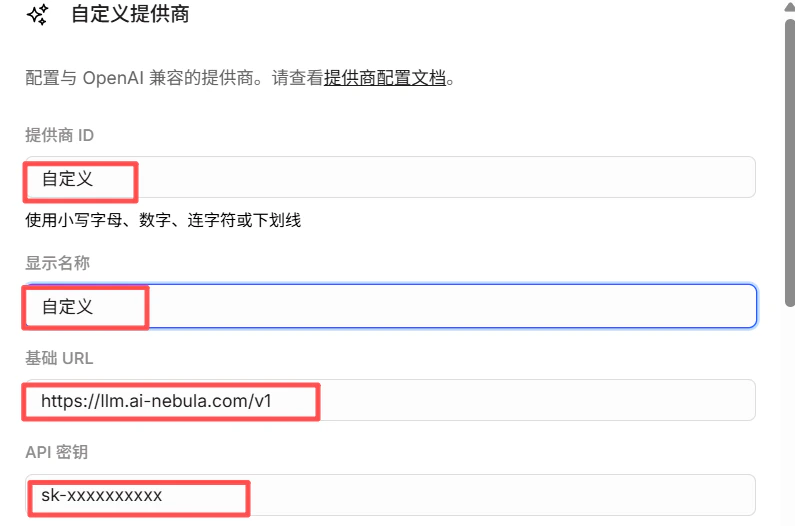
3. 填写:
* **提供商 ID**:如 `leapx`(小写、数字、连字符或下划线)
* **显示名称**:如 `LeapX API`
* **基础 URL**:`https://api.leapx-hub.com/v1`(必须以 `/v1` 结尾)
* **API 密钥**:粘贴 LeapX API 密钥
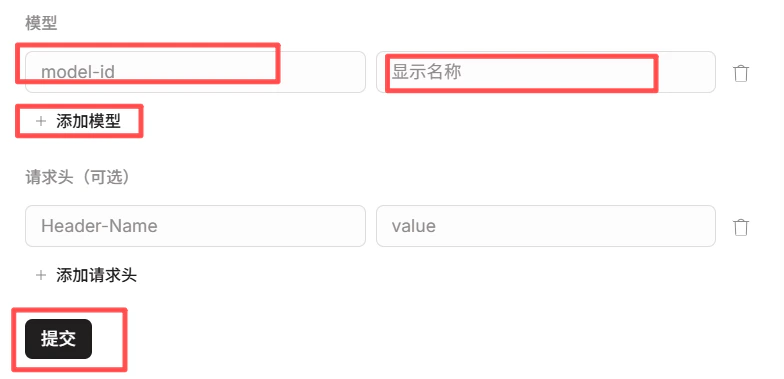
4. 在 **模型** 中添加需要使用的模型(如 `gpt-4o`、`claude-sonnet-4-20250514` 等),模型 ID 与 [LeapX 模型列表](https://leapx-hub.com/#/models) 一致。
5. 保存后,在模型选择中使用 **提供商ID/模型ID**(如 `leapx/gpt-4o`)。
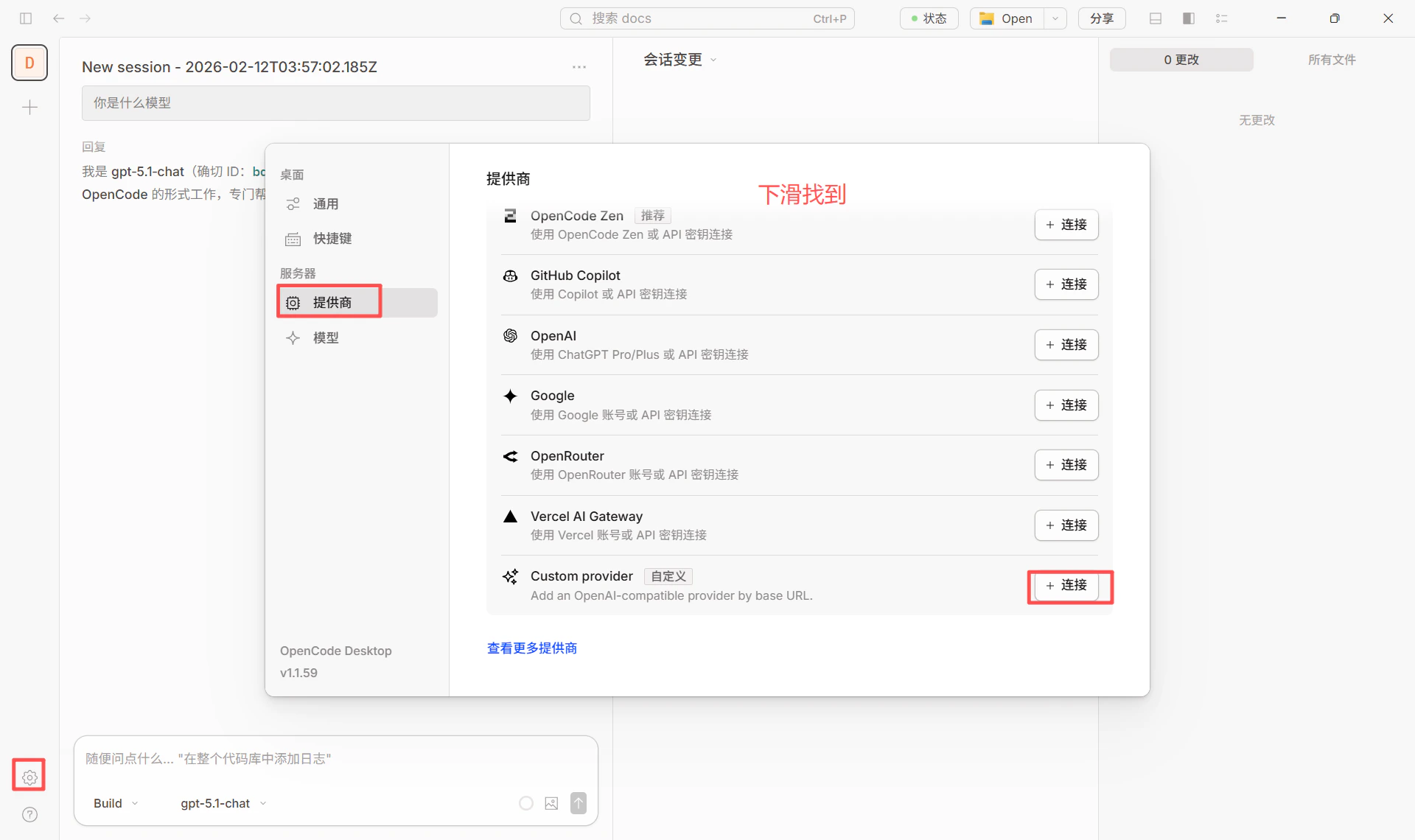 **具体配置信息**(与上图对应):
* **基础 URL**:`https://api.leapx-hub.com/v1`
* **API 密钥**:在 [LeapX 控制台](https://leapx-hub.com/#/keys) 获取(格式如 `sk-xxxxxxxxxxxxx`)
* **模型**:从 [LeapX 模型列表](https://leapx-hub.com/#/models) 选择并填入模型 ID
**具体配置信息**(与上图对应):
* **基础 URL**:`https://api.leapx-hub.com/v1`
* **API 密钥**:在 [LeapX 控制台](https://leapx-hub.com/#/keys) 获取(格式如 `sk-xxxxxxxxxxxxx`)
* **模型**:从 [LeapX 模型列表](https://leapx-hub.com/#/models) 选择并填入模型 ID
 ### 3. 切换模型
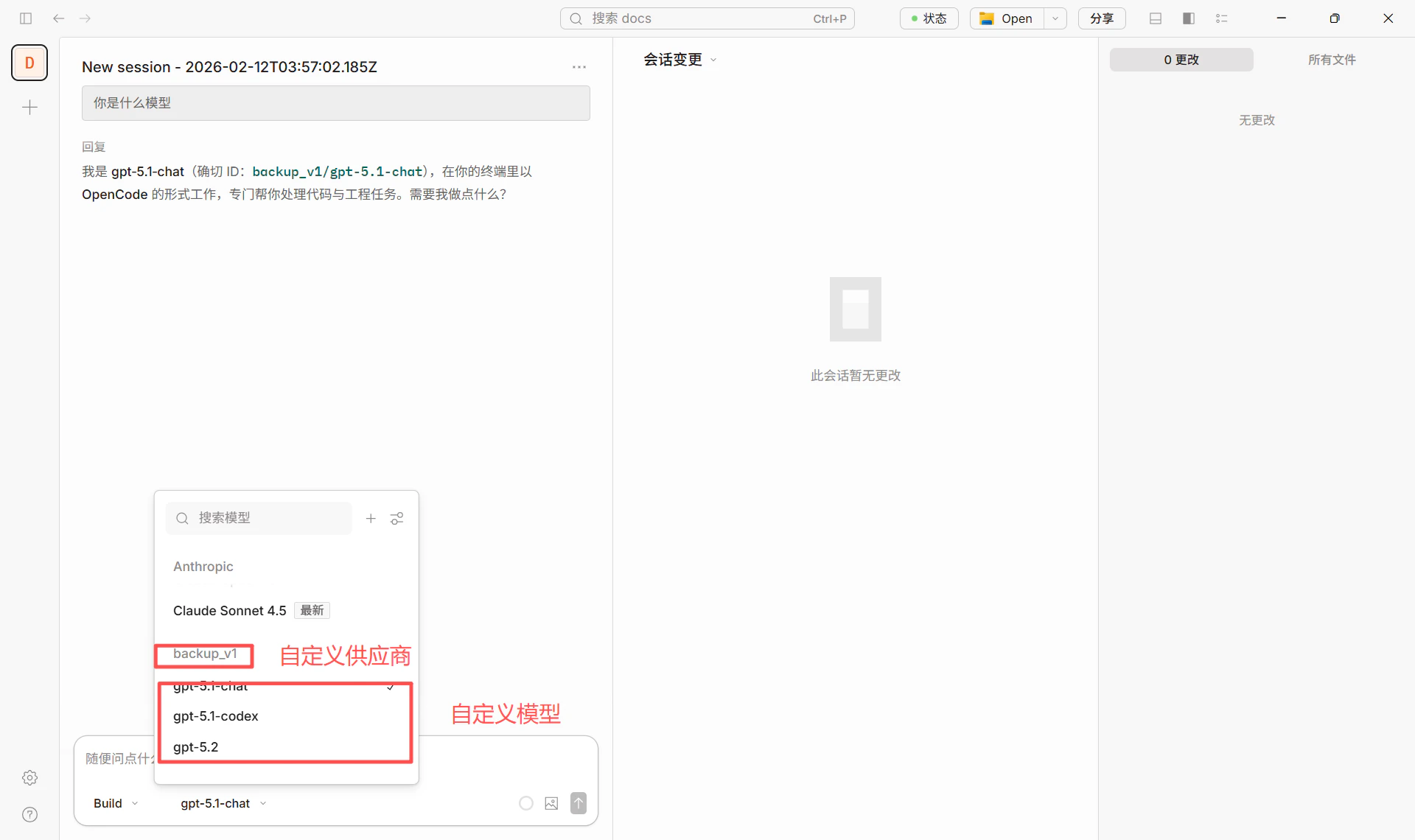
在对话或设置中选择已配置的提供商与模型(如 `leapx/gpt-4o`)即可切换。
### 3. 切换模型
在对话或设置中选择已配置的提供商与模型(如 `leapx/gpt-4o`)即可切换。
 * 若使用自建或备用 LeapX 服务,将 **基础 URL** 改为对应地址,例如 `http://your-server:3003/v1`。
* 默认模型可在项目或全局 `opencode.json` 中设置 `"model": "leapx/模型ID"`。
## 三、部分模型需使用 Responses API(重要)
部分模型的访问接口与常规 Chat Completions 不同,需使用 **Responses API**。若在 OpenCode 中选用这类模型时出现类似错误:
部分 Azure / OpenAI 新模型**仅支持 Responses API**,不支持传统的 Chat Completions 接口。错误示例:
> The chatCompletion operation does not work with the specified model, **gpt-5.1-codex**. Please choose different model and try again.
下图为该错误在界面中的实际表现:
* 若使用自建或备用 LeapX 服务,将 **基础 URL** 改为对应地址,例如 `http://your-server:3003/v1`。
* 默认模型可在项目或全局 `opencode.json` 中设置 `"model": "leapx/模型ID"`。
## 三、部分模型需使用 Responses API(重要)
部分模型的访问接口与常规 Chat Completions 不同,需使用 **Responses API**。若在 OpenCode 中选用这类模型时出现类似错误:
部分 Azure / OpenAI 新模型**仅支持 Responses API**,不支持传统的 Chat Completions 接口。错误示例:
> The chatCompletion operation does not work with the specified model, **gpt-5.1-codex**. Please choose different model and try again.
下图为该错误在界面中的实际表现:
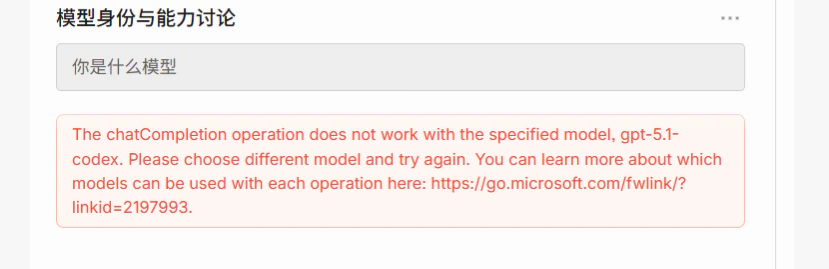 说明当前请求走了 **Chat Completions**,而该模型在服务端只开放 **Responses API**,需通过配置改为使用正确接口。
### 3.1 需要走 Responses API 的模型(典型)
| 模型 ID / 系列 | 说明 |
| ------------------------ | ------------------------------------------ |
| **gpt-5.1-codex** | GPT 5.1 Codex,编程/代码场景,仅支持 Responses API |
| **gpt-5.2-codex** | GPT 5.2 Codex,同上 |
| **o3** / **o3-pro** | 推理模型,部分部署仅提供 Responses API |
| **o4-mini** 等 o4 系列 | 同上,以实际部署与官方文档为准 |
| **computer-use-preview** | 与 Responses API 的 computer-use 工具配合使用的实验模型 |
完整列表及更新以 **Azure / 厂商官方文档** 为准,例如:
* [Azure OpenAI Responses API](https://learn.microsoft.com/zh-cn/azure/ai-foundry/openai/how-to/responses)
* 错误提示中的链接:[查看各模型支持的操作类型](https://go.microsoft.com/fwlink/?linkid=2197993)
### 3.2 在 OpenCode 中如何配置(推荐:配置文件添加参数)
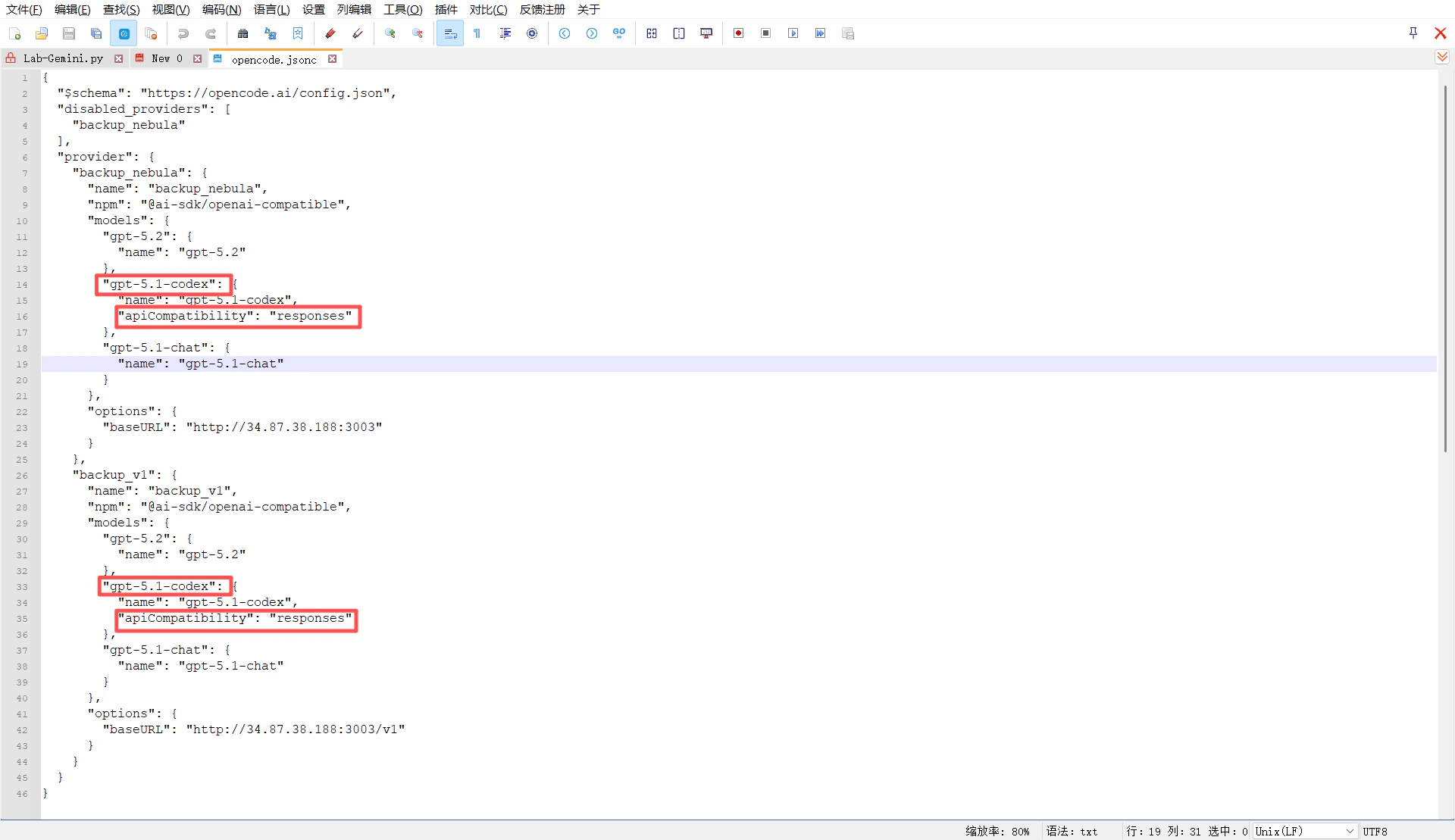
通过**在配置文件中为对应模型添加 `apiCompatibility` 参数**,即可让 OpenCode 对该模型使用 **Responses API**,无需改代码。
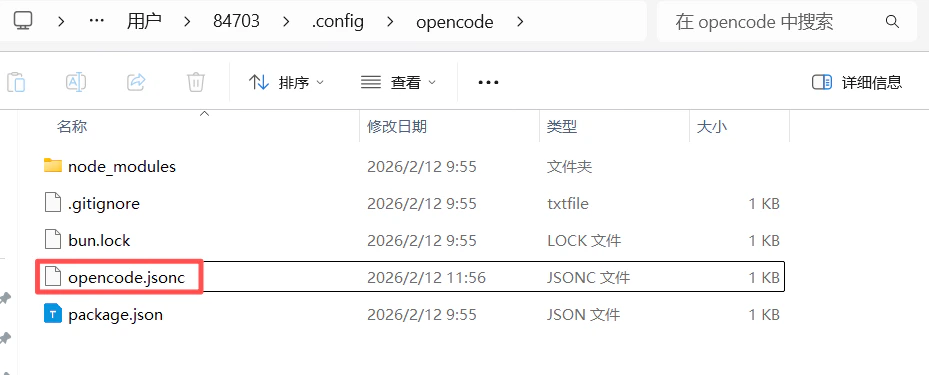
**1. 找到配置文件**
* **Windows**:`C:\Users\<用户名>\.config\opencode\opencode.jsonc`
* **macOS / Linux**:`~/.config/opencode/opencode.jsonc`\
如图:
说明当前请求走了 **Chat Completions**,而该模型在服务端只开放 **Responses API**,需通过配置改为使用正确接口。
### 3.1 需要走 Responses API 的模型(典型)
| 模型 ID / 系列 | 说明 |
| ------------------------ | ------------------------------------------ |
| **gpt-5.1-codex** | GPT 5.1 Codex,编程/代码场景,仅支持 Responses API |
| **gpt-5.2-codex** | GPT 5.2 Codex,同上 |
| **o3** / **o3-pro** | 推理模型,部分部署仅提供 Responses API |
| **o4-mini** 等 o4 系列 | 同上,以实际部署与官方文档为准 |
| **computer-use-preview** | 与 Responses API 的 computer-use 工具配合使用的实验模型 |
完整列表及更新以 **Azure / 厂商官方文档** 为准,例如:
* [Azure OpenAI Responses API](https://learn.microsoft.com/zh-cn/azure/ai-foundry/openai/how-to/responses)
* 错误提示中的链接:[查看各模型支持的操作类型](https://go.microsoft.com/fwlink/?linkid=2197993)
### 3.2 在 OpenCode 中如何配置(推荐:配置文件添加参数)
通过**在配置文件中为对应模型添加 `apiCompatibility` 参数**,即可让 OpenCode 对该模型使用 **Responses API**,无需改代码。
**1. 找到配置文件**
* **Windows**:`C:\Users\<用户名>\.config\opencode\opencode.jsonc`
* **macOS / Linux**:`~/.config/opencode/opencode.jsonc`\
如图:
 **2. 在自定义提供商的模型配置中添加参数**
在已配置的提供商(如指向 LeapX 或自建 API 的 custom provider)里,对需要走 Responses API 的模型(如 `gpt-5.1-codex`)增加 **`"apiCompatibility": "responses"`**,例如:
**2. 在自定义提供商的模型配置中添加参数**
在已配置的提供商(如指向 LeapX 或自建 API 的 custom provider)里,对需要走 Responses API 的模型(如 `gpt-5.1-codex`)增加 **`"apiCompatibility": "responses"`**,例如:
 ```jsonc theme={null}
{
"$schema": "https://opencode.ai/config.json",
"disabled_providers": [
"backup_leapx"
],
"provider": {
"backup_leapx": {
"name": "backup_leapx",
"npm": "@ai-sdk/openai-compatible",
"models": {
"gpt-5.2": {
"name": "gpt-5.2"
},
"gpt-5.1-codex": {
"name": "gpt-5.1-codex",
"apiCompatibility": "responses"
},
"gpt-5.1-chat": {
"name": "gpt-5.1-chat"
}
},
"options": {
"baseURL": "xxxxxxxx"
}
},
"backup_v1": {
"name": "backup_v1",
"npm": "@ai-sdk/openai-compatible",
"models": {
"gpt-5.2": {
"name": "gpt-5.2"
},
"gpt-5.1-codex": {
"name": "gpt-5.1-codex",
"apiCompatibility": "responses"
},
"gpt-5.1-chat": {
"name": "gpt-5.1-chat"
}
},
"options": {
"baseURL": "http://34.87.38.188:3003/v1"
}
}
}
}
```
保存后,在 OpenCode 中选择该提供商下的 `gpt-5.1-codex`(如 `backup_leapx/gpt-5.1-codex`),请求会以 **Responses API** 格式发往该 baseURL。
**3. 配置成功示例**
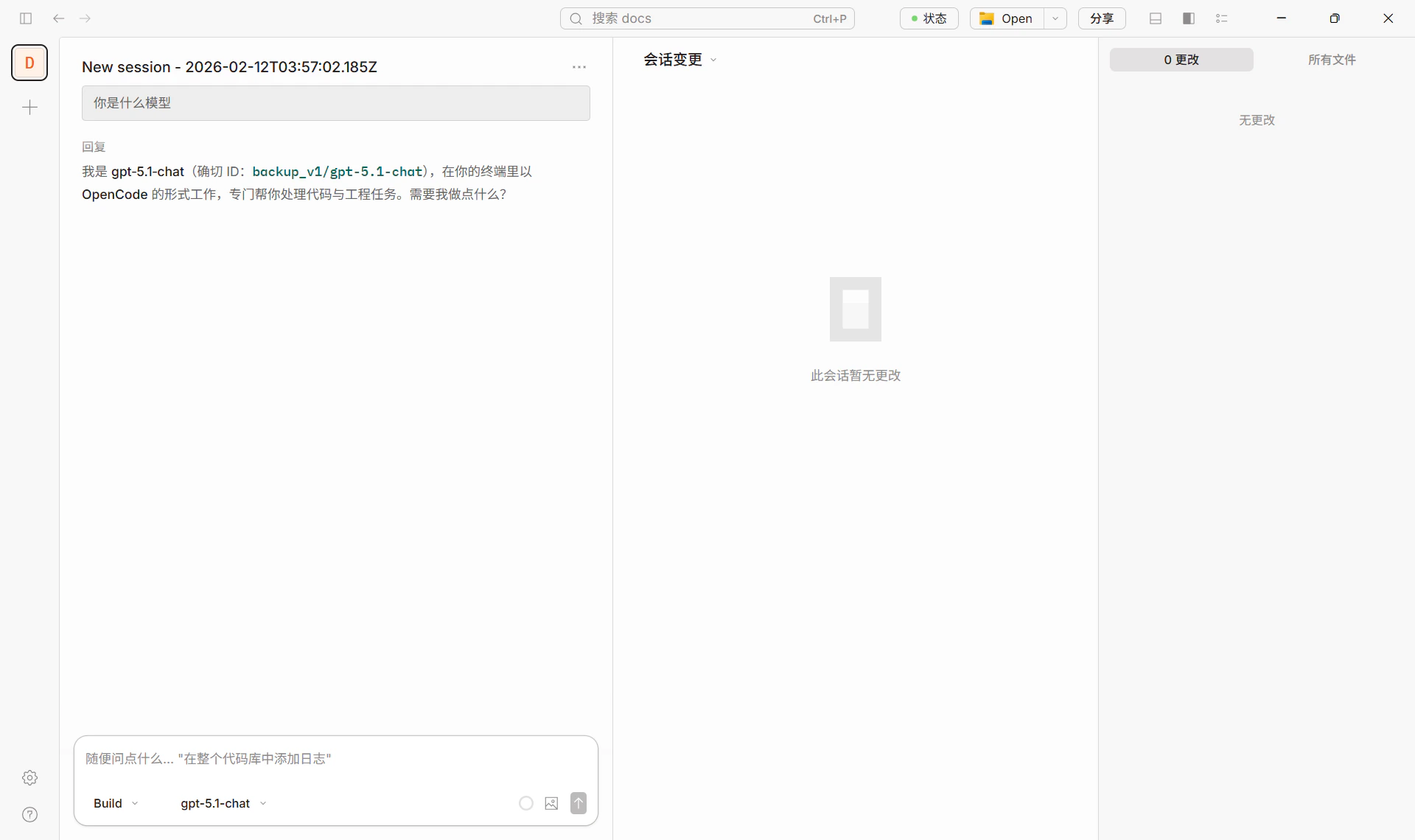
下图为在 OpenCode 中选用配置好的模型(如 `backup_v1/gpt-5.1-chat`)正常对话的示例。
```jsonc theme={null}
{
"$schema": "https://opencode.ai/config.json",
"disabled_providers": [
"backup_leapx"
],
"provider": {
"backup_leapx": {
"name": "backup_leapx",
"npm": "@ai-sdk/openai-compatible",
"models": {
"gpt-5.2": {
"name": "gpt-5.2"
},
"gpt-5.1-codex": {
"name": "gpt-5.1-codex",
"apiCompatibility": "responses"
},
"gpt-5.1-chat": {
"name": "gpt-5.1-chat"
}
},
"options": {
"baseURL": "xxxxxxxx"
}
},
"backup_v1": {
"name": "backup_v1",
"npm": "@ai-sdk/openai-compatible",
"models": {
"gpt-5.2": {
"name": "gpt-5.2"
},
"gpt-5.1-codex": {
"name": "gpt-5.1-codex",
"apiCompatibility": "responses"
},
"gpt-5.1-chat": {
"name": "gpt-5.1-chat"
}
},
"options": {
"baseURL": "http://34.87.38.188:3003/v1"
}
}
}
}
```
保存后,在 OpenCode 中选择该提供商下的 `gpt-5.1-codex`(如 `backup_leapx/gpt-5.1-codex`),请求会以 **Responses API** 格式发往该 baseURL。
**3. 配置成功示例**
下图为在 OpenCode 中选用配置好的模型(如 `backup_v1/gpt-5.1-chat`)正常对话的示例。
 ### 3.3 小结
| 场景 | 做法 |
| ------------------------------------------------------- | ----------------------------------------------------------------------------------------------------- |
| 使用 **gpt-5.1-codex / gpt-5.2-codex** 等仅支持 Responses 的模型 | 在 `opencode.jsonc` 中,于对应自定义提供商的 **models** 里为该模型添加 **`"apiCompatibility": "responses"`**(见上文配置示例与截图)。 |
| 使用 **gpt-4o、claude-sonnet** 等常规模型 | 无需添加 `apiCompatibility`,按上文「快速配置」使用 LeapX 或自定义提供商即可。 |
## 四、推荐模型(经 LeapX 使用)
| 类型 | 模型 ID 示例 | 说明 |
| ---------- | ---------------------------------------------- | ------------------------ |
| 编程 / Codex | `gpt-5.1-codex` | 需确保走 Responses API(见第三节) |
| 通用对话 / 编程 | `gpt-5.2`、`gpt-5.1-chat` | 直接使用,无需 Responses 特殊配置 |
| 长文本 / 综合 | `claude-sonnet-4-20250514`、`claude-sonnet-4-5` | 同上 |
| 性价比 | `gpt-4.1-mini`、`gemini-2.5-flash` | 同上 |
具体可用模型与 ID 以 [LeapX 模型列表](https://leapx-hub.com/#/models) 为准。
### 配置成功示例
下图为使用 LeapX API 在 OpenCode 中正常对话的示例。
## 五、参考链接
* OpenCode 官网与下载:[https://opencode.ai/](https://opencode.ai/)
* OpenCode 配置与模型说明:[Models](https://opencode.ai/docs/models)、[Providers](https://opencode.ai/docs/providers)
### 3.3 小结
| 场景 | 做法 |
| ------------------------------------------------------- | ----------------------------------------------------------------------------------------------------- |
| 使用 **gpt-5.1-codex / gpt-5.2-codex** 等仅支持 Responses 的模型 | 在 `opencode.jsonc` 中,于对应自定义提供商的 **models** 里为该模型添加 **`"apiCompatibility": "responses"`**(见上文配置示例与截图)。 |
| 使用 **gpt-4o、claude-sonnet** 等常规模型 | 无需添加 `apiCompatibility`,按上文「快速配置」使用 LeapX 或自定义提供商即可。 |
## 四、推荐模型(经 LeapX 使用)
| 类型 | 模型 ID 示例 | 说明 |
| ---------- | ---------------------------------------------- | ------------------------ |
| 编程 / Codex | `gpt-5.1-codex` | 需确保走 Responses API(见第三节) |
| 通用对话 / 编程 | `gpt-5.2`、`gpt-5.1-chat` | 直接使用,无需 Responses 特殊配置 |
| 长文本 / 综合 | `claude-sonnet-4-20250514`、`claude-sonnet-4-5` | 同上 |
| 性价比 | `gpt-4.1-mini`、`gemini-2.5-flash` | 同上 |
具体可用模型与 ID 以 [LeapX 模型列表](https://leapx-hub.com/#/models) 为准。
### 配置成功示例
下图为使用 LeapX API 在 OpenCode 中正常对话的示例。
## 五、参考链接
* OpenCode 官网与下载:[https://opencode.ai/](https://opencode.ai/)
* OpenCode 配置与模型说明:[Models](https://opencode.ai/docs/models)、[Providers](https://opencode.ai/docs/providers)