> ## Documentation Index
> Fetch the complete documentation index at: https://docs.leapx-hub.com/llms.txt
> Use this file to discover all available pages before exploring further.
# OpenCode
> OpenCode integration guide: use multiple models via LeapX API
## 1. Overview
OpenCode is an open-source AI coding assistant supporting 75+ models and local deployment. With **LeapX API**, you can use mainstream and latest models (e.g. GPT, Claude, Gemini) in OpenCode and configure custom providers and models.
**Download**: [https://opencode.ai/](https://opencode.ai/)
## 2. Quick setup (LeapX API)
### 2.1 Get an API key
Create and copy your API key from the [LeapX API console](https://leapx-hub.com/#/keys).
### 2.2 Configure a custom provider in OpenCode
1. Open OpenCode and go to **Server / Provider** settings.
2. Add a **custom provider** (Configure an OpenAI compatible provider).
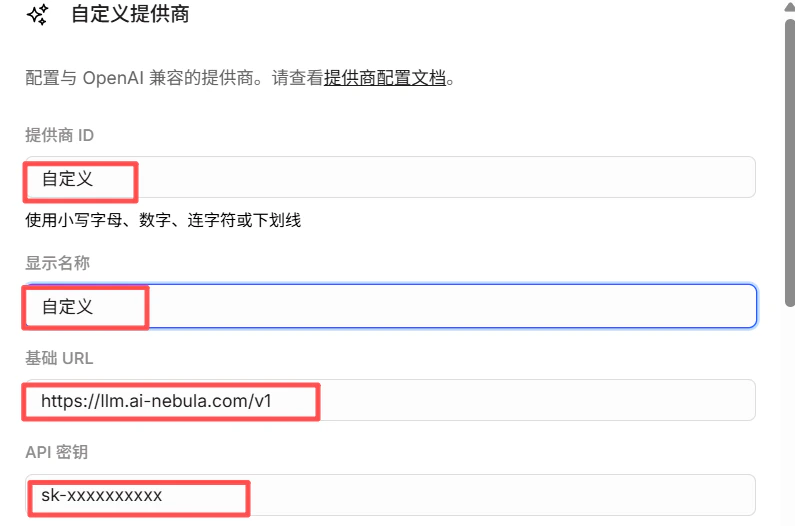
3. Fill in:
* **Provider ID**: e.g. `leapx` (lowercase, digits, hyphens or underscores)
* **Display name**: e.g. `LeapX API`
* **Base URL**: `https://api.leapx-hub.com/v1` (must end with `/v1`)
* **API key**: paste your LeapX API key
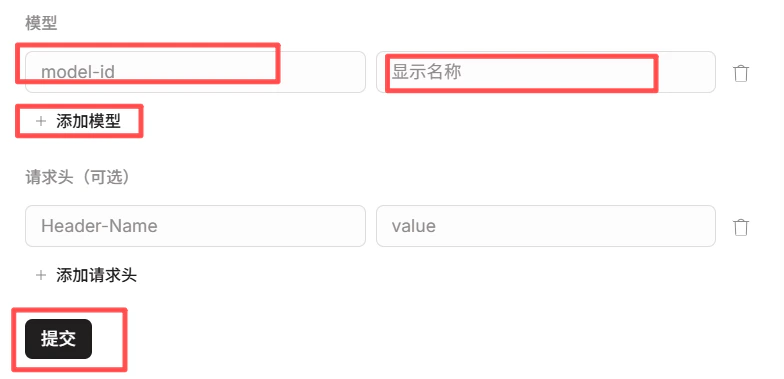
4. Under **Models**, add the models you need (e.g. `gpt-4o`, `claude-sonnet-4-20250514`). Model IDs must match the [LeapX model list](https://leapx-hub.com/#/models).
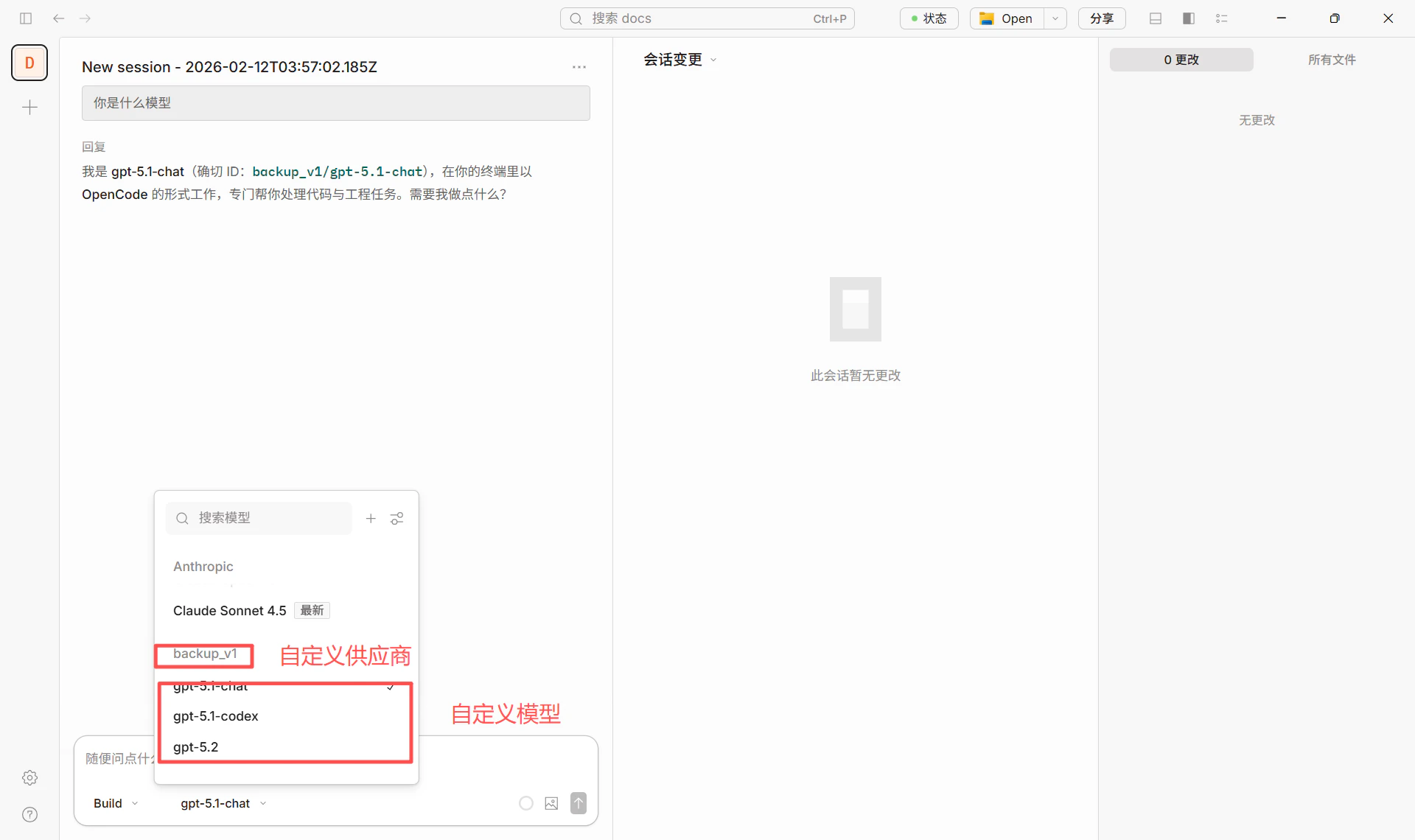
5. After saving, use **providerID/modelID** in the model selector (e.g. `leapx/gpt-4o`).
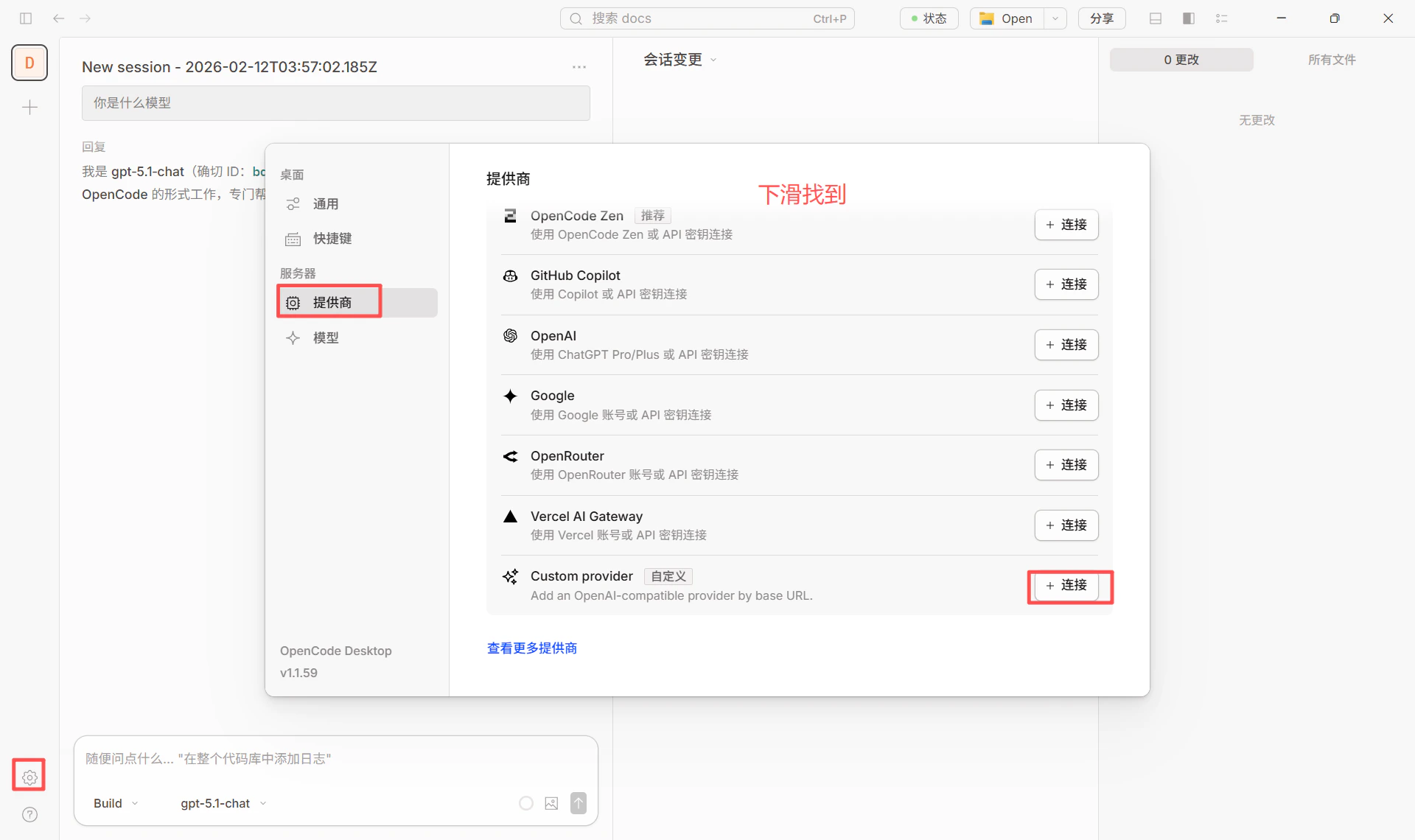 **Configuration reference** (matching the screenshots above):
* **Base URL**: `https://api.leapx-hub.com/v1`
* **API key**: from [LeapX console](https://leapx-hub.com/#/keys) (e.g. `sk-xxxxxxxxxxxxx`)
* **Models**: choose from [LeapX model list](https://leapx-hub.com/#/models) and enter the model ID
**Configuration reference** (matching the screenshots above):
* **Base URL**: `https://api.leapx-hub.com/v1`
* **API key**: from [LeapX console](https://leapx-hub.com/#/keys) (e.g. `sk-xxxxxxxxxxxxx`)
* **Models**: choose from [LeapX model list](https://leapx-hub.com/#/models) and enter the model ID
 ### 2.3 Switching models
In the chat or settings, select the configured provider and model (e.g. `leapx/gpt-4o`) to switch.
### 2.3 Switching models
In the chat or settings, select the configured provider and model (e.g. `leapx/gpt-4o`) to switch.
 * For self-hosted or backup LeapX, set **Base URL** to that address, e.g. `http://your-server:3003/v1`.
* Default model can be set in project or global `opencode.json` with `"model": "leapx/modelID"`.
## 3. Some models require the Responses API (important)
Some models use a different API than standard Chat Completions and require the **Responses API**. If you see an error like this when using such a model in OpenCode:
Some Azure / OpenAI models **only support the Responses API** and do not support the traditional Chat Completions endpoint. Example error:
> The chatCompletion operation does not work with the specified model, **gpt-5.1-codex**. Please choose different model and try again.
The screenshot below shows how this error appears in the UI:
* For self-hosted or backup LeapX, set **Base URL** to that address, e.g. `http://your-server:3003/v1`.
* Default model can be set in project or global `opencode.json` with `"model": "leapx/modelID"`.
## 3. Some models require the Responses API (important)
Some models use a different API than standard Chat Completions and require the **Responses API**. If you see an error like this when using such a model in OpenCode:
Some Azure / OpenAI models **only support the Responses API** and do not support the traditional Chat Completions endpoint. Example error:
> The chatCompletion operation does not work with the specified model, **gpt-5.1-codex**. Please choose different model and try again.
The screenshot below shows how this error appears in the UI:
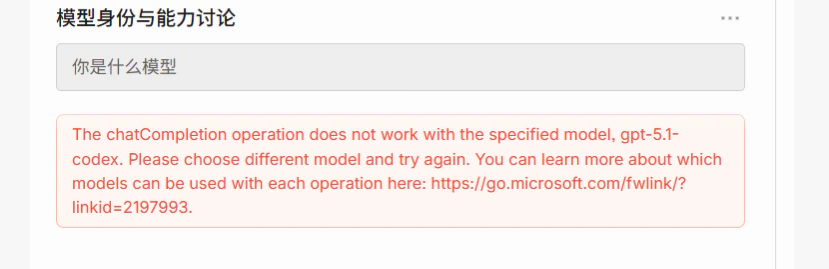 This means the request was sent as **Chat Completions** while the model only exposes **Responses API** on the server. You need to configure OpenCode to use the correct API.
### 3.1 Models that require the Responses API (typical)
| Model ID / family | Notes |
| ------------------------ | ------------------------------------------------------------- |
| **gpt-5.1-codex** | GPT 5.1 Codex, coding; Responses API only |
| **gpt-5.2-codex** | GPT 5.2 Codex, same as above |
| **o3** / **o3-pro** | Reasoning models; some deployments only offer Responses API |
| **o4-mini** and other o4 | Same; check deployment and vendor docs |
| **computer-use-preview** | Experimental model used with Responses API computer-use tools |
For the full and up-to-date list, see **Azure / vendor documentation**, e.g.:
* [Azure OpenAI Responses API](https://learn.microsoft.com/en-us/azure/ai-foundry/openai/how-to/responses)
* Link from the error message: [Which models work with each operation](https://go.microsoft.com/fwlink/?linkid=2197993)
### 3.2 How to configure in OpenCode (recommended: add parameter in config)
You can make OpenCode use the **Responses API** for a given model by **adding the `apiCompatibility` parameter** for that model in the config file. No code changes are required.
**1. Locate the config file**
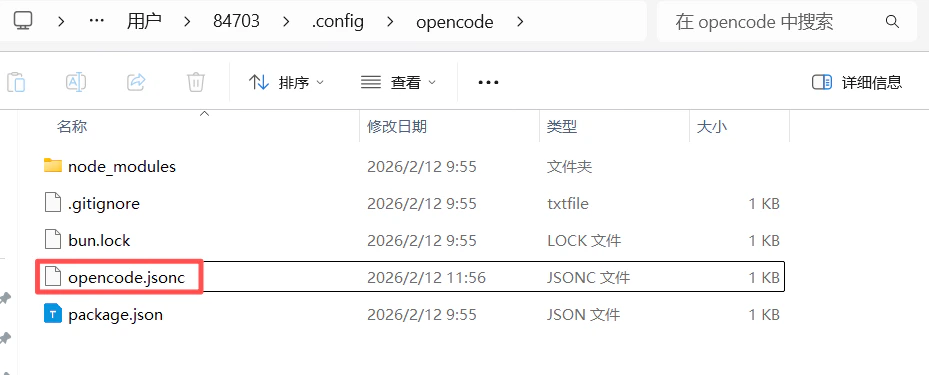
* **Windows**: `C:\Users\\.config\opencode\opencode.jsonc`
* **macOS / Linux**: `~/.config/opencode/opencode.jsonc`\
You can also use `opencode.json` or `opencode.jsonc` in your project directory.
**2. Add the parameter to the model config under your custom provider**
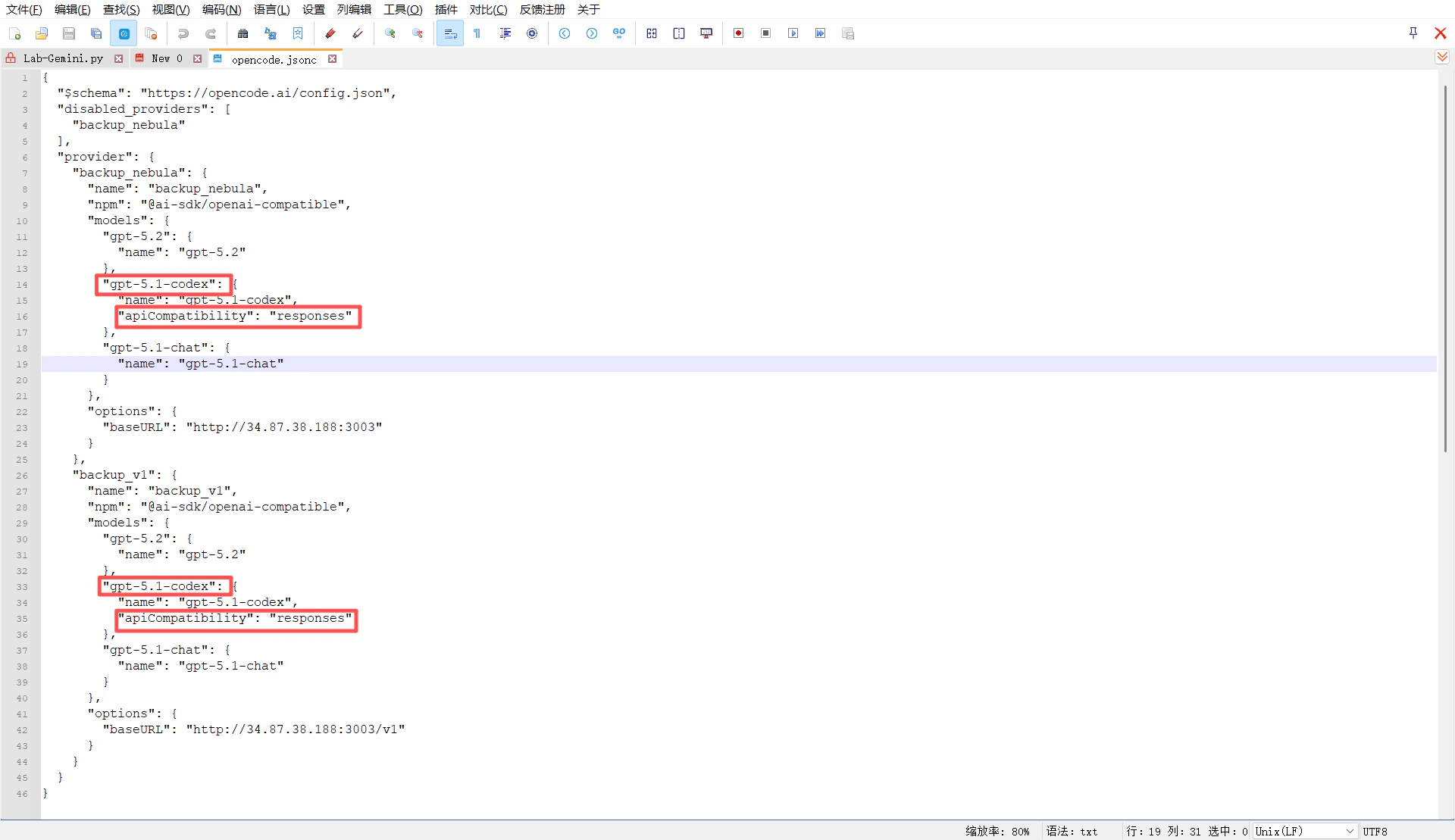
In your existing provider (e.g. custom provider pointing to LeapX or your own API), add **`"apiCompatibility": "responses"`** for models that need the Responses API (e.g. `gpt-5.1-codex`). Example:
This means the request was sent as **Chat Completions** while the model only exposes **Responses API** on the server. You need to configure OpenCode to use the correct API.
### 3.1 Models that require the Responses API (typical)
| Model ID / family | Notes |
| ------------------------ | ------------------------------------------------------------- |
| **gpt-5.1-codex** | GPT 5.1 Codex, coding; Responses API only |
| **gpt-5.2-codex** | GPT 5.2 Codex, same as above |
| **o3** / **o3-pro** | Reasoning models; some deployments only offer Responses API |
| **o4-mini** and other o4 | Same; check deployment and vendor docs |
| **computer-use-preview** | Experimental model used with Responses API computer-use tools |
For the full and up-to-date list, see **Azure / vendor documentation**, e.g.:
* [Azure OpenAI Responses API](https://learn.microsoft.com/en-us/azure/ai-foundry/openai/how-to/responses)
* Link from the error message: [Which models work with each operation](https://go.microsoft.com/fwlink/?linkid=2197993)
### 3.2 How to configure in OpenCode (recommended: add parameter in config)
You can make OpenCode use the **Responses API** for a given model by **adding the `apiCompatibility` parameter** for that model in the config file. No code changes are required.
**1. Locate the config file**
* **Windows**: `C:\Users\\.config\opencode\opencode.jsonc`
* **macOS / Linux**: `~/.config/opencode/opencode.jsonc`\
You can also use `opencode.json` or `opencode.jsonc` in your project directory.
**2. Add the parameter to the model config under your custom provider**
In your existing provider (e.g. custom provider pointing to LeapX or your own API), add **`"apiCompatibility": "responses"`** for models that need the Responses API (e.g. `gpt-5.1-codex`). Example:
 ```jsonc theme={null}
{
"$schema": "https://opencode.ai/config.json",
"disabled_providers": [
"backup_leapx"
],
"provider": {
"backup_leapx": {
"name": "backup_leapx",
"npm": "@ai-sdk/openai-compatible",
"models": {
"gpt-5.2": {
"name": "gpt-5.2"
},
"gpt-5.1-codex": {
"name": "gpt-5.1-codex",
"apiCompatibility": "responses"
},
"gpt-5.1-chat": {
"name": "gpt-5.1-chat"
}
},
"options": {
"baseURL": "xxxxxxxx"
}
},
"backup_v1": {
"name": "backup_v1",
"npm": "@ai-sdk/openai-compatible",
"models": {
"gpt-5.2": {
"name": "gpt-5.2"
},
"gpt-5.1-codex": {
"name": "gpt-5.1-codex",
"apiCompatibility": "responses"
},
"gpt-5.1-chat": {
"name": "gpt-5.1-chat"
}
},
"options": {
"baseURL": "http://34.87.38.188:3003/v1"
}
}
}
}
```
After saving, when you select that provider’s `gpt-5.1-codex` in OpenCode (e.g. `backup_leapx/gpt-5.1-codex`), requests will be sent to that baseURL in **Responses API** format.
**3. Success example**
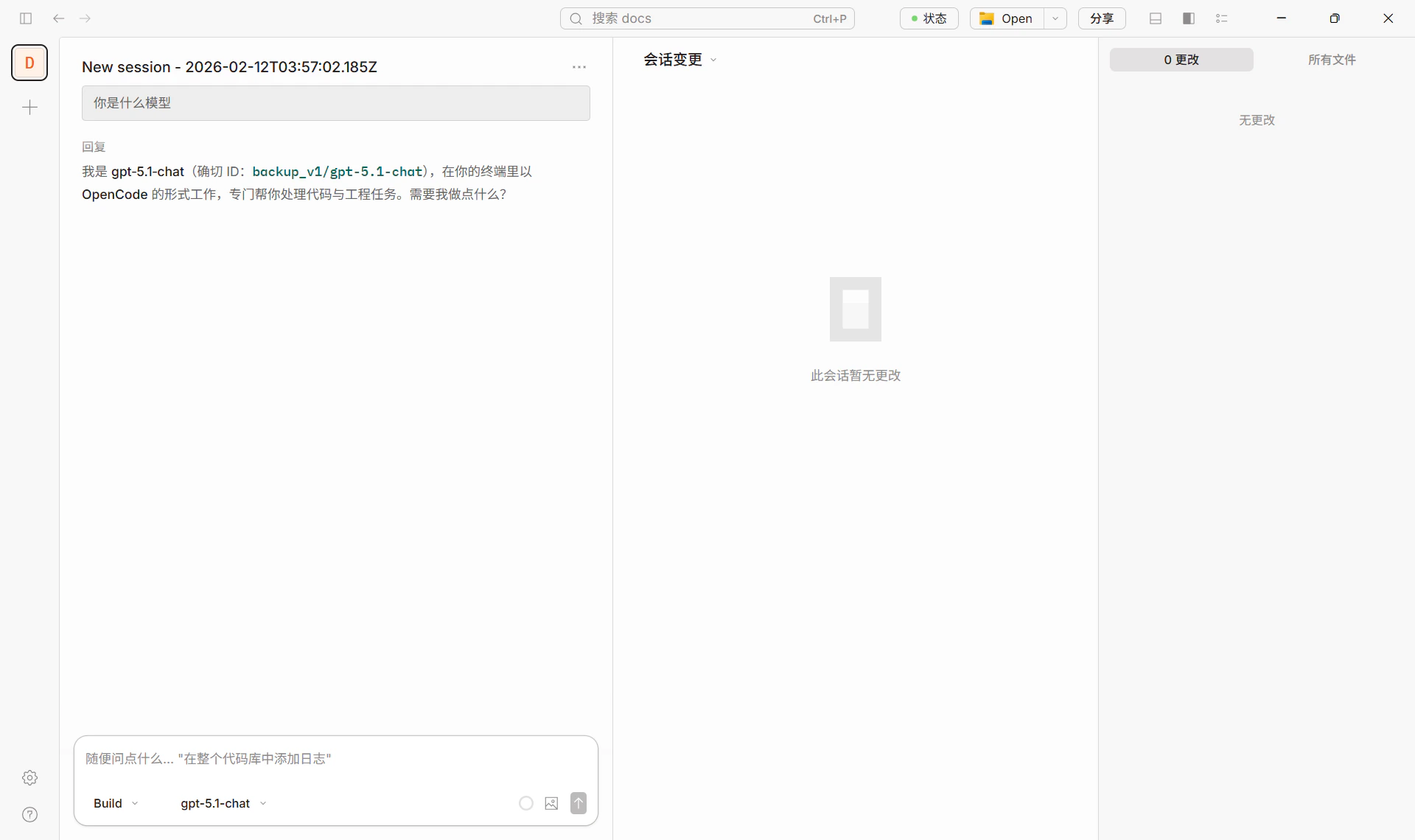
The screenshot below shows a normal chat in OpenCode using a correctly configured model (e.g. `backup_v1/gpt-5.1-chat`).
```jsonc theme={null}
{
"$schema": "https://opencode.ai/config.json",
"disabled_providers": [
"backup_leapx"
],
"provider": {
"backup_leapx": {
"name": "backup_leapx",
"npm": "@ai-sdk/openai-compatible",
"models": {
"gpt-5.2": {
"name": "gpt-5.2"
},
"gpt-5.1-codex": {
"name": "gpt-5.1-codex",
"apiCompatibility": "responses"
},
"gpt-5.1-chat": {
"name": "gpt-5.1-chat"
}
},
"options": {
"baseURL": "xxxxxxxx"
}
},
"backup_v1": {
"name": "backup_v1",
"npm": "@ai-sdk/openai-compatible",
"models": {
"gpt-5.2": {
"name": "gpt-5.2"
},
"gpt-5.1-codex": {
"name": "gpt-5.1-codex",
"apiCompatibility": "responses"
},
"gpt-5.1-chat": {
"name": "gpt-5.1-chat"
}
},
"options": {
"baseURL": "http://34.87.38.188:3003/v1"
}
}
}
}
```
After saving, when you select that provider’s `gpt-5.1-codex` in OpenCode (e.g. `backup_leapx/gpt-5.1-codex`), requests will be sent to that baseURL in **Responses API** format.
**3. Success example**
The screenshot below shows a normal chat in OpenCode using a correctly configured model (e.g. `backup_v1/gpt-5.1-chat`).
 ### 3.3 Summary
| Scenario | What to do |
| ------------------------------------------------------------------------------ | ----------------------------------------------------------------------------------------------------------------------------------------------------------------- |
| Models that only support Responses (e.g. **gpt-5.1-codex**, **gpt-5.2-codex**) | In `opencode.jsonc`, under the custom provider’s **models**, add **`"apiCompatibility": "responses"`** for that model (see config example and screenshots above). |
| Regular models (e.g. **gpt-4o**, **claude-sonnet**) | No `apiCompatibility` needed; use LeapX or a custom provider as in “Quick setup” above. |
## 4. Recommended models (via LeapX)
| Category | Model ID examples | Notes |
| ---------------------- | ----------------------------------------------- | ------------------------------------ |
| Coding / Codex | `gpt-5.1-codex` | Ensure Responses API (see Section 3) |
| General chat / coding | `gpt-5.2`, `gpt-5.1-chat` | Use as-is; no Responses config |
| Long context / general | `claude-sonnet-4-20250514`, `claude-sonnet-4-5` | Same |
| Cost-effective | `gpt-4.1-mini`, `gemini-2.5-flash` | Same |
See the [LeapX model list](https://leapx-hub.com/#/models) for available models and IDs.
### Success example
The screenshot below shows a normal chat in OpenCode using LeapX API.
## 5. References
* OpenCode site and download: [https://opencode.ai/](https://opencode.ai/)
* OpenCode config and models: [Models](https://opencode.ai/docs/models), [Providers](https://opencode.ai/docs/providers)
### 3.3 Summary
| Scenario | What to do |
| ------------------------------------------------------------------------------ | ----------------------------------------------------------------------------------------------------------------------------------------------------------------- |
| Models that only support Responses (e.g. **gpt-5.1-codex**, **gpt-5.2-codex**) | In `opencode.jsonc`, under the custom provider’s **models**, add **`"apiCompatibility": "responses"`** for that model (see config example and screenshots above). |
| Regular models (e.g. **gpt-4o**, **claude-sonnet**) | No `apiCompatibility` needed; use LeapX or a custom provider as in “Quick setup” above. |
## 4. Recommended models (via LeapX)
| Category | Model ID examples | Notes |
| ---------------------- | ----------------------------------------------- | ------------------------------------ |
| Coding / Codex | `gpt-5.1-codex` | Ensure Responses API (see Section 3) |
| General chat / coding | `gpt-5.2`, `gpt-5.1-chat` | Use as-is; no Responses config |
| Long context / general | `claude-sonnet-4-20250514`, `claude-sonnet-4-5` | Same |
| Cost-effective | `gpt-4.1-mini`, `gemini-2.5-flash` | Same |
See the [LeapX model list](https://leapx-hub.com/#/models) for available models and IDs.
### Success example
The screenshot below shows a normal chat in OpenCode using LeapX API.
## 5. References
* OpenCode site and download: [https://opencode.ai/](https://opencode.ai/)
* OpenCode config and models: [Models](https://opencode.ai/docs/models), [Providers](https://opencode.ai/docs/providers)